Key takeaways
- A LinkedIn headline has 220 characters and appears in search results, connection requests and next to every comment you leave.
- Decide your goal and audience first, then pull keywords from job descriptions for the roles you want.
- Formulas such as "Role | What You Deliver" and "Skill & Skill Expert | Outcome" turn a job title into a searchable pitch.
- An analysis of 1,000 hired professionals found complete profiles had a 71% higher chance of an interview.
- Use LinkedIn's Open to Work feature to show availability and keep the headline for your skills.
A good LinkedIn profile headline uses its 220 characters to say who you are, which skills or results you bring, and who you help, in words recruiters and clients type into search. Your job title alone rarely does that, so add the keywords and the outcome that set you apart.
The headline is the first line people read about you and the frame for everything else on your profile. Write it well and more of the right people find you and click through.
Why is your LinkedIn headline more than a job title?
The headline is the most visible text on your profile. With more than a billion members on the platform, a plain "Marketing Manager at XYZ Company" wastes the space: it's generic, says nothing particular about you and gives nobody a reason to stop scrolling.
It also travels with you across LinkedIn. It appears in search results, beside your name on connection requests, and under every comment you leave on a post.
A well-planned headline does three jobs:
- It gets you found. Recruiters search by keyword all day, and the headline is one of the places those keywords count most for where you appear in LinkedIn's search results.
- It shows what you're worth. In a second or two it should give the reader a reason to open your profile.
- It filters. A specific headline draws in the people and opportunities you want and quietly turns away the ones that don't fit.
Does a strong headline change how many people view your profile?
The data says yes. A headline that earns the click affects how many people view your profile, and the profile as a whole affects what happens next. An analysis of 1,000 profiles of professionals who got hired found that candidates with complete, well-filled profiles had a 71% higher chance of getting an interview. The first impression shapes every interaction that follows.
Once the headline is in shape, the next step is getting your profile seen through posts. On LinkedInLikes, other members like and comment on your new posts by hand from their own accounts, which gives a post its first activity. Pair a clear headline with steady posting and you give people two reasons to look at your profile.
What should you decide before writing a headline?
Plan before you type. A good headline is a message aimed at specific readers, and it starts with your current goal and the people you want to reach.
Start with what you want from LinkedIn right now. You might be job hunting and want recruiters to notice you, consulting and looking for new clients, or building a solid network of peers in your field. The answer changes how you write every word.
Who is your headline for?
With the goal set, pick the audience. A headline for a technical recruiter reads differently from one for a potential marketing client.
- Recruiters: think the way they search. They spend their day in LinkedIn Recruiter looking for concrete skills and job titles, so use terms such as "Full-Stack Development", "Python" or "Machine Learning".
- Clients: they care about the result you produce. Drop the jargon and name the benefit, along the lines of "Helping B2B Brands Grow with SEO" or "Creating Content That Converts".
- Collaborators: show the area you work in and why you'd be interesting to know. "AI Ethics Researcher" or "Open-Source Contributor" does that well.
Which keywords belong in your headline?
Keywords connect you with the people you're trying to reach. LinkedIn's search relies on them heavily, and the headline is one of the best places to put them, so choosing them carefully isn't optional.
Brainstorm terms tied to your industry, your skills and the role you want. A useful trick is to read job descriptions for positions you'd apply for and note the words that keep coming back. For a "Software Developer", that could be hard skills such as "React", "Node.js" or "AWS", plus the job title itself.
The headline has two readers: a person who needs a reason to stop scrolling, and a search system that needs the exact terms to match.
Write for both and you'll show up in the right searches and leave a first impression people remember. For more formulas and examples, see this guide to a winning LinkedIn headline for job seekers. If you'd like a starting draft, our free LinkedIn headline generator suggests options from your role and skills.
Which headline formulas work on LinkedIn?
With goals, audience and keywords settled, it's time to write. Instead of improvising, start from a formula built to catch attention and match LinkedIn's search. Treat them as frameworks: they help people understand your worth quickly, and you can bend them.
The "Role | What You Deliver" formula
This one is popular because it's direct. It tells the reader who you are and which problem you solve, which suits anyone who wants their impact to be obvious.
Name your job title, then the concrete benefit you bring. That small change moves attention from what you do to the results people get.
- Before: Marketing Manager
- After: B2B SaaS Marketing Manager | Lead Generation & User Acquisition for Tech Startups
The second version carries keywords ("B2B SaaS", "Lead Generation", "User Acquisition") and names the audience ("Tech Startups"). Nobody has to guess what this person does or for whom.
Here your preparation (goals, audience, keywords) turns into one clear statement.
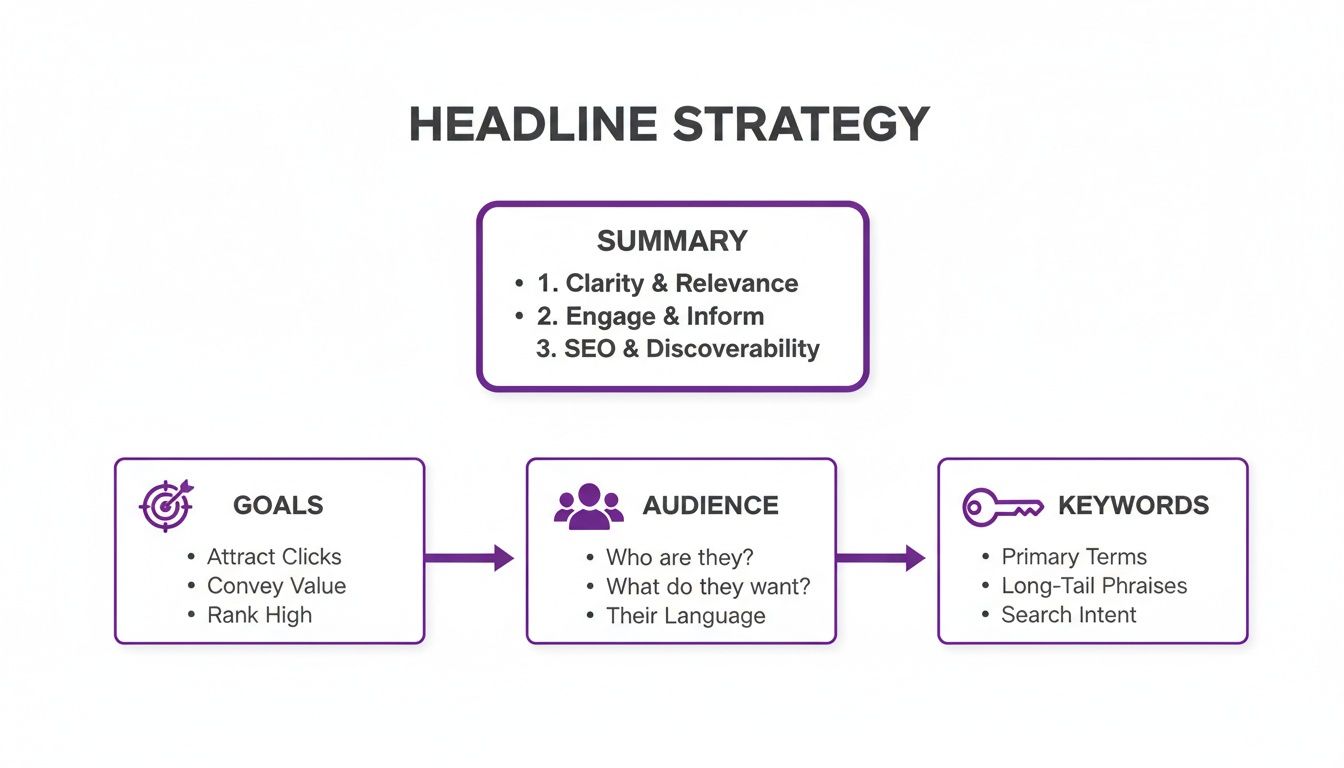
The three parts depend on each other. When goals, audience and keywords point the same way, a dull job title becomes a headline that pulls in the right opportunities.
The "Skill & Skill Expert | Outcome" formula
This structure fits specialists, technical people and anyone whose worth rests on specific skills that are in demand. It signals ability from the first words.
- Before: Software Developer
- Stronger: Python & Machine Learning Expert | Building Data Systems That Inform Business Decisions
It puts high-demand skills first and ties them to a business outcome. A recruiter searching for that technical profile will spot it right away.
What other headline formulas are there?
The two formulas above are good starting points, but different goals call for different structures, whether you're a freelancer looking for clients or a founder building a brand. Here is a quick comparison of other formulas that work.
| Formula | Who it suits | Example |
|---|---|---|
| Role + keyword string | Anyone who wants to be found in search for one role or industry | Senior Product Manager |
| "I help X do Y" | Consultants, coaches and freelancers with a clear niche | I Help SaaS Founders Grow to Seven-Figure ARR with Paid Acquisition |
| Achievement first | Professionals with strong results they can put numbers on | Award-Winning Content Strategist |
| Mission and title | Founders, executives and people whose work centres on a mission | Making Remote Work Easier @ Outrank |
Mix parts of these formulas freely. The goal is a structure that sounds like you and tells your professional story clearly. A headline is a 220-character summary of who you are at work and the value you create, so pick the formula that tells that story best.
What do good LinkedIn headlines look like in different jobs?
Examples make it easier to see why a headline works. Below are a few for common fields, with what makes each one effective and the usual mistake to avoid.
Notice how each example combines the role, specific skills and the value delivered, in the vocabulary of the audience it's aimed at.
Developers and engineers
For developers, the tech stack does most of the work. Technical recruiters search for "React", "Node.js" or "Python" far more than for "Software Developer", and the headline is where you get matched.
- Stronger: Senior Full-Stack Engineer | Building High-Traffic Web Applications with React & Node.js
- Why it works: it contains the exact terms recruiters type, and "Building High-Traffic Web Applications" shows the impact and level of the work on top of the list of technologies.
- Common mistake: "Software Developer at [Company]" and nothing more. Recruiters then have to dig through the whole profile to find your skills, and most won't.
If you contribute to open source, mention it too. It adds credibility that recruiters and peers can check.
Social media managers
Social media professionals have to show two things in one line: that they can make a strong post and that they understand the business reasoning behind it.
- Stronger: Social Media Strategist | Growing B2C Brands on TikTok & Instagram | Content Creation & Community Management
- Why it works: it's specific. "B2C Brands" and "TikTok & Instagram" tell a certain kind of company that this is the person they need, and the in-demand skills come first.
- Common mistake: playful labels such as "Social Media Guru" or "Content Ninja". They sound fun and tell a hiring manager nothing. Use plain professional language that says what you do.
In a creative field, the headline should connect your creative work to business results and show that what you make serves a purpose.
Content creators and strategists
A content professional's headline should show strategy: that you understand SEO, lead generation and conversions as well as storytelling.
- Stronger: Content Strategist & Storyteller | Creating SEO Content That Converts for SaaS Companies
- Why it works: it uses strong terms such as "SEO Content" and "Converts", and the smartest part is naming a specific, high-value niche, "SaaS Companies". A SaaS founder or marketing lead scrolling past will stop.
- Common mistake: a bare "Writer and Editor". It undersells the strategic side and the business results a top content professional delivers.
How do you get more people to see your new headline?
A finished headline is half the job; people still have to see it. Updating your profile and leaving it there won't do much. LinkedIn needs signs that you're active and that what you post is worth showing to others.
When you publish a post, the first hour matters most. Likes, comments and shares in that window tell the algorithm the post is interesting, it shows the post to a wider audience, and some of those readers click through to your profile and its new headline.
How do you get the first reactions on a post?
Most people have posted something they were proud of and watched it sit there with no reactions. Those first few likes and comments can feel impossible to get.
That's what LinkedInLikes is for. You paste the link to your post, choose comments or likes, and set how many points each action gets. Members do the action by hand from their own LinkedIn accounts and write comments in their own words. You get points the same way, by doing other members' requests, and you start with 100 starter points after confirming your email. Points can't be bought, and there are no paid plans.
A good headline earns the click, but your posts and their early reactions are what put your profile in front of people to begin with.
And standing out has never been harder. LinkedIn has more than 1.2 billion members, and 8.72 million job applications are sent every day. The headline is your first, and often your only, chance to be noticed.
Profiles that list five or more skills get up to 17 times more views, but it's the headline that makes people want to look at those skills.
It also pays to understand how recruiters filter candidates. Learning how Applicant Tracking Systems work, including ideas like the ATS filter 90/10 rule, helps you adjust your whole profile, headline included, so it gets past automated filters and reaches a person.
Questions people ask about LinkedIn headlines
A few questions come up again and again once a headline is written. Small details here make a big difference, so getting them right helps you avoid mistakes that weaken how you come across.
How often should you update your LinkedIn headline?
Treat the headline as something that changes with your career, not something you write once and forget. A good rule: revisit it whenever something changes in your working life.
Update it when:
- You start job hunting. Rewrite it toward the roles you want, with the keywords those roles use.
- You get a new title or a new job. Don't let the headline fall behind; put the new title and responsibilities up front.
- You earn an important skill or certification. A newly earned PMP or AWS certification belongs in the headline and tells recruiters something concrete.
- You change direction. If you're moving from marketing to product management, the headline should start telling the new story straight away.
A headline that never changes can make your career look like it's standing still. Updating it shows you're active and making progress, and it takes five minutes.
What should your headline say if you're unemployed?
People get this wrong often. Focus on the value you offer instead of your employment status.
Don't spend your 220 characters on "Unemployed" or "Seeking new opportunities". Recruiters don't type those words into search; they search for skills, titles and abilities.
Keep the headline about your professional identity and use LinkedIn's "Open to Work" feature to show you're available. That's its purpose: the green photo frame tells recruiters you're available, and your headline space stays free for marketing yourself.
Examples for when you're between roles:
- Senior Software Engineer | Building High-Load Backend Systems with Java & AWS
- Digital Marketing Manager | Growing Pipeline with SEO & Paid Media Strategy
- Corporate Controller (CPA) | Scaling Audit-Proof Accounting Functions
These are confident and full of keywords. They tell a recruiter what you do, which says far more than what you don't have.
Can a good headline really get recruiters to notice you?
Yes. The headline is one of the most heavily weighted fields in LinkedIn's search, alongside your job title.
When a recruiter looks for a hire, the words in your headline decide to a large degree whether your profile appears in the results at all. A headline with the right keywords is what makes you findable in the first place.
Look at it from their side. Recruiters scroll through hundreds or thousands of profiles a day, and the headline is their first filter. It has to tell them at a glance that you're the person they're looking for. A generic headline gets scrolled past, and a sharp, specific one earns the click on your profile.
Before you save a new version, paste it into our LinkedIn character counter to confirm it fits in 220 characters, or run your whole profile through the LinkedIn profile analyzer.
Grow on LinkedIn
- LinkedIn growth course
- How LinkedIn pods work
- Swapping likes and comments on LinkedIn
- Connect for connect on LinkedIn
- Like for like on LinkedIn works when you give first and share early
- Free LinkedIn growth tools
More articles
- More LinkedIn headline examples
- How to grow on LinkedIn in 2026
- LinkedIn benchmarks for reactions and comments in 2026, and how to calculate yours
- How to request a connection on LinkedIn
Next step: write three versions of your headline using the formulas above, check each against a job description you'd apply for, and keep the one with the most matching keywords.
Frequently asked questions
220 characters. Use them for your role, your main skills or keywords, and the outcome you deliver. Our character counter shows how much space you have left.
Your role, the keywords recruiters or clients search for, and the result you produce or the audience you serve. Formulas such as "Role | What You Deliver" or "I help X do Y" are good starting points.
No. Recruiters don't search for those words. Keep the headline about your skills and use LinkedIn's "Open to Work" feature, which adds a green frame to your photo.
Yes. The headline is one of the most heavily weighted fields in LinkedIn search, along with your job title, so the terms in it affect whether recruiters see your profile at all.
A generator can give you drafts to edit. Try our free LinkedIn headline generator, then adjust the result with keywords from job descriptions you're interested in.
Whenever your situation changes: you start job hunting, get a new title or change jobs, earn a certification, or move into a new field.