Key takeaways
- Your profile does the first round of networking for you, so fix the headline, About section, skills and experience before you send requests.
- Profiles with 5 or more skills get up to 17 times more views.
- Filtering search by 2nd-degree connections, location, current company and industry narrows a broad list to people worth contacting.
- Twenty to fifty personal connection requests a week is a pace you can keep up without sending generic invitations.
- The first 60–90 minutes after you publish a post are when early likes and comments matter most for how far it travels.
To network on LinkedIn, start with a profile that makes people want to accept you, then search for the right people with filters, send short personal connection requests, and keep in touch by posting and commenting. The relationship grows when you offer something useful before you ask for anything.
Your networking begins before you send a single request. Visitors judge your profile first, so the opening move is turning it from a dusty CV into a page people are glad they opened. Get that right and people often accept your request before you have to explain yourself.
How do you build a LinkedIn profile that invites connections?
Treat your profile as your own landing page. It is the first impression you make, and it either opens conversations or ends them. A good profile does more than list what you have done; it shows what you are worth to the person reading it.
Start with the headline, and go further than your job title. “Marketing Manager” is fine. “Marketing Manager helping SaaS startups grow” tells a reader who you are, what you do and who you do it for, which is the kind of person people want to know.
Here is how to handle the four profile sections that matter most.
Profile sections that do the most work
| Section | What to do | Why it helps |
|---|---|---|
| Headline | Go past the job title and name the result you bring and who you bring it to. | Visitors can tell at once whether you are relevant, and you show up in more of the right searches. |
| About section | Write in the first person and link what you have done to where you are heading. | It makes you easier to relate to and approach; people warm to a story more than to a list of jobs. |
| Skills and endorsements | Add at least 5 relevant skills and ask colleagues to endorse them. | It adds credibility and helps LinkedIn show your profile to the people searching for those skills. |
| Experience | Skip the copy-paste from your CV and give each role 2–3 bullet points on your biggest results. | It shows you deliver results as well as do the job. Use numbers wherever you can. |
These sections are not optional. A visitor should get three answers within seconds: who you are, what you do, and why they should connect with you.
Your story and your skills
The About section is where you join the dots. Explain why you made your career moves as well as what they were. Write as if you were talking to someone over coffee, in the first person, and the section reads like a person instead of a form.
Skills are easy to neglect. Profiles with 5 or more skills get up to 17 times more views, which is a big jump in how often recruiters, clients and peers come across you.
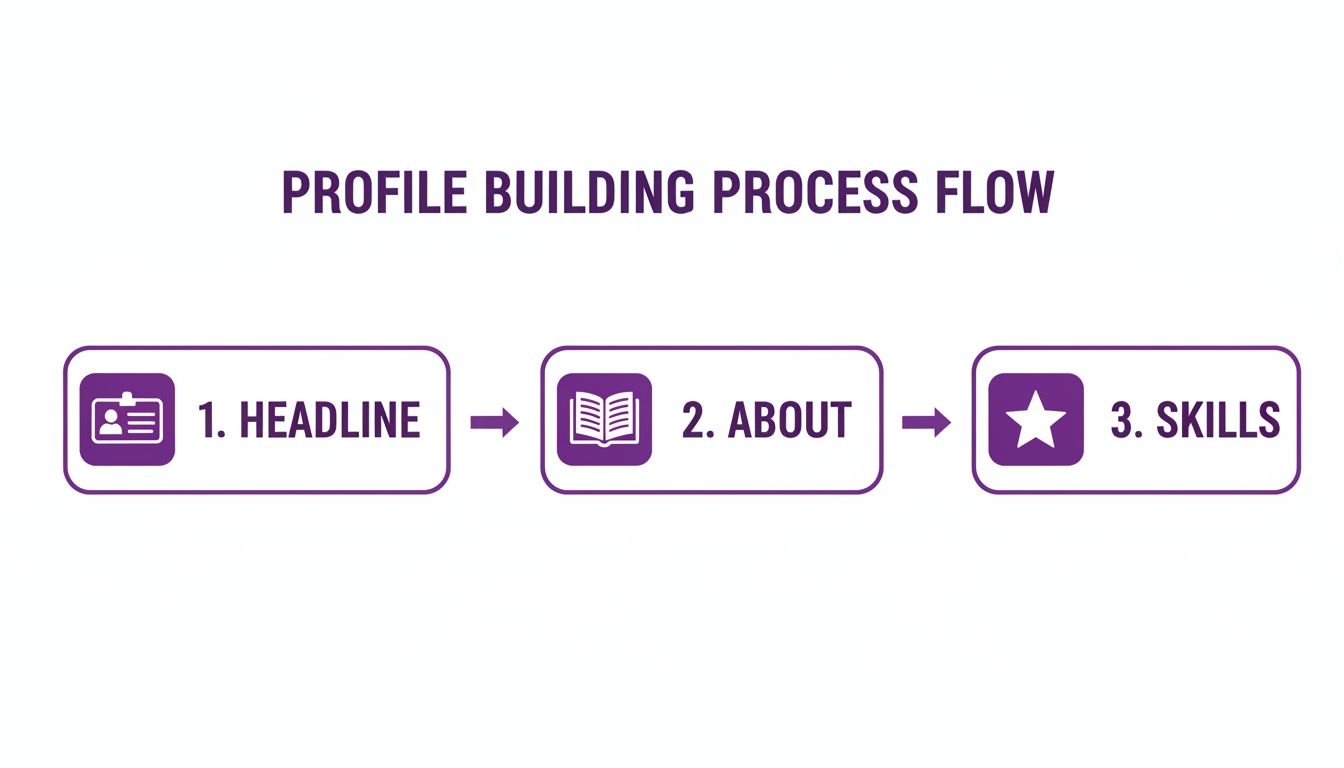
Those three steps (a clear headline, your story in About, and skills to back it up) give you a professional identity that draws the right people to you.
If your profile tells any visitor who you are, what you do and why they should connect, you are on the right track.
A sharp profile is the base of any networking plan, and it is never finished. Keep looking for ways to improve your LinkedIn profile, and check yours with the free LinkedIn profile analyzer.
Once the profile and your first posts are ready, early traction helps. LinkedIn favours posts that get likes and comments soon after publishing. LinkedInLikes is a free community where members like and comment on each other’s posts by hand from their own accounts, so a new post doesn’t start from zero.
How do you find the right people to connect with on LinkedIn?
Good networking has little to do with collecting as many connections as possible. It means building a chosen group of professionals whose goals overlap with yours. Step one is to stop pressing “Connect” on everyone and start searching with a plan.
Typing a job title into the search bar is only the beginning. Boolean operators narrow the results a lot: a search for "Marketing Manager" AND "SaaS" NOT "Director" returns a much cleaner list than a plain title search and filters out most of the noise.
Which search filters help you find the right people?
With a simple search running, open the “All filters” button. That is how a broad list becomes a handful of people who fit.
- Connections: Start with 2nd-degree connections. You already share a contact, which gives you a warm way to open the conversation.
- Location: Use it when you work in a particular region. It surfaces local leaders in your industry, possible clients and peers you could meet for coffee.
- Current company: When you want a way into a company you admire, this filter finds everyone from its recruiters to the head of the exact department you need.
- Industry: Simple, and it keeps your outreach relevant. You are talking to people in your own professional world, so your request feels far less random.
What should you check on a profile before you connect?
When someone looks promising, hold off on “Connect” for two minutes and read their profile. That quick look tells you whether they fit and gives you something specific to mention in your request.
A two-minute profile check is what turns a generic request into a personal one. Look for recent activity, shared interests and mutual contacts.
Check their recent activity first. Someone who posted or commented in the last month is much more likely to see your request and answer it. Then skim their About section and experience to confirm they are who you think. A shared group or interest makes the easiest opening line.
Timing counts too. LinkedIn members are more active than ever, and posting and commenting at busy times, usually Tuesday to Thursday mornings, helps you get noticed. Your own profile has to attract people as well; our guide on how to get more followers on LinkedIn covers that side.
How do you write a LinkedIn connection request people accept?
A blank, generic request is the online version of a limp handshake: forgettable, a bit lazy and usually ignored. Treat the request as the first line of a real conversation and it stops being a formality.
The default “I’d like to add you to my professional network on LinkedIn” rarely does the job.
The requests people accept are short, direct and personal. All you need to show is that you did a little homework and have a real reason to get in touch, which answers the question every recipient silently asks: why me.
Explain why you are reaching out
Find one thing you have in common and mention it in the first sentence. That makes a cold approach feel closer to being introduced by a friend, and people accept far more readily when they can see genuine interest.
Four openings that work again and again:
- A shared connection: “Hi [Name], I see we’re both connected to [Mutual Connection’s Name]. I’m building my network of people in [Industry] and would be glad to connect.”
- Their recent activity: “Hi [Name], I liked your recent post on [Topic], and what you said about [Specific Detail] matched what I’ve seen. I’d like to connect and keep up with your work.”
- A common group: “Hello [Name], I read your comment in the [Group Name] group. I’m also interested in [Topic] and would appreciate the chance to connect.”
- Interest in their company: “Hi [Name], I’ve been following [Their Company]’s work in [Field] and it’s impressive. As a [Your Role] myself, I’d be glad to connect.”
A good connection request is about the other person: their work, their posts or the context you share. Shift the focus to them and people become much more open to connecting.
Examples for three common situations
Each of these is brief and gets straight to the reason.
A possible client:
“Hi Alex, your company’s recent project on eco-friendly shipping materials stood out. I work on eco-friendly supply chain logistics and would like to connect and follow your work.”
A peer in your industry:
“Hi Sarah, I noticed we both started out in digital marketing around the same time. I always like meeting other marketers, so I hope we can connect.”
A recruiter for a specific role:
“Hello David, I’ve just applied for the Product Manager role at [Company]. My background in user research and product delivery fits the role closely, and I’d like to learn more about your team.”
Writing personal notes takes effort at first. An AI writing assistant can speed up the drafting while you keep the personal details, and a handful of careful requests will still do better than a hundred generic ones. Our guide to LinkedIn connection messages has more templates.
How do posting and commenting help you network on LinkedIn?
Once your profile is in shape and your network is growing, the next step is taking part. Connecting and then going quiet gets you very little. Your network and your credibility grow when you post and when you respond to what others share.
A long list of connections means little until you show up in their feeds regularly. That is how you stay on people’s minds and become known as someone who understands your field. Each post and comment adds a little to your professional reputation.

What should you post on LinkedIn?
Share things that help, interest or inform the people you want to reach. You don’t need to be a professional writer, but you do need to sound like yourself; readers notice quickly when a post rings false.
A few ideas that tend to work:
- Share an industry article with your own view. Skip the bare share button and add two or three sentences on why it caught your attention or what you took from it. That puts your voice in the post and shows you think for yourself.
- Tell a story from your career. A hard problem you solved or a lesson you learned the hard way. Personal stories like these are often the posts that get the most likes and comments.
- Change formats now and then. Plain text posts can do well, but don’t stick to one format. Carousel posts are reported to reach impression rates of around 6.60%, well ahead of most other post types. The LinkedIn carousel maker helps you build one.
When you share useful posts regularly, people start to see you as someone worth listening to, and they have a reason to follow you.
Why does the first hour after posting matter?
The first 60–90 minutes after you publish carry a lot of weight. The likes and comments a post gets in that window tell LinkedIn whether to show it to more people.
A quick round of early likes and comments gives a post its start. This is where many good posts stop: the content is solid, but nobody reacts early enough for it to travel.
The first hour after posting is your best chance to reach further, and real likes and comments that arrive early are what open up wider reach.
LinkedInLikes is built around that window. Members support each other’s posts by hand: you paste a post link, choose likes or comments, and set how many points each one is worth. You start with 100 points and get more by liking and commenting on other members’ posts. Read more on how to get more LinkedIn comments, or ask members to comment on your post.
How do you turn LinkedIn connections into real relationships?
This is where the real work starts, and where most people lose momentum. Accepting a request is a handshake; it marks the start, and much more is needed after it.
Turning a new connection into a working relationship takes a thoughtful, human approach, and it starts with giving before you ask. Your first few interactions should offer something useful with no strings attached. That builds trust and shows you care about the person as well as the opportunity.
How do you follow up with new connections without being pushy?
Your first message after connecting sets the tone for everything after it. Don’t open with a sales pitch or a favour, because that is the quickest way to be ignored.
“Thanks for connecting, [Name]. Glad to have you in my network.” is a fine, low-pressure start. After that, look for natural ways to add to the conversation.
- Send something worth reading: When you come across a post they would like, pass it on with a short note, such as “Saw this piece on [Topic] and thought of you.”
- Put people in touch: If someone in your network could help them, offer to introduce the two of them.
- Comment on their posts: A thoughtful comment shows public support for what they care about.
The aim is to go from a random name in their connection list to a familiar, welcome name in their feed. Showing up regularly and giving first is how you get there.
A common pattern looks like this. You connect with a project manager, and a few weeks later she posts about new software her team is testing. You send her a detailed review you found useful. She is grateful, and the exchange turns into a real conversation about where your industry is heading. Focusing on conversations like that does far more than collecting connections like baseball cards.
When should you suggest a call?
After a few light exchanges like these, you can think about the next step: a virtual coffee, a short call, or a more direct conversation about professional goals.
There is no exact rule for when to ask. You will notice the moment when your messages feel less like formal check-ins and more like an easy professional friendship.
When you do ask, say exactly why. “Let’s chat sometime” is easy to ignore, so try something direct that respects their time.
An example to reuse:
“Hi [Name], I’ve enjoyed our messages about [Topic]. I have a few ideas on [Specific Subject] I think you’d find interesting, and I’d like to talk them through on a quick 15-minute call next week if you’re open to it.”
It shows you value their schedule and have a clear reason to meet, so saying yes is easy. As these relationships grow, your own active posts matter even more; our guide on how to get more LinkedIn reposts has ideas.
Common questions about networking on LinkedIn
A few questions come up again and again once people start networking seriously. Here are short answers.
How many connection requests should you send a week?
Twenty to fifty personal requests a week is a good range. It is a pace you can keep up without sending generic invitations or triggering LinkedIn’s activity limits.
Who you connect with matters more than the count. One thoughtful request to the right person is worth more than a hundred generic ones. Look for people in your target industry, at companies you respect, or active in the same professional groups as you.
What is the biggest networking mistake on LinkedIn?
Making the first interaction about yourself. Networking builds a relationship over time, and the classic error is sending a request and following up straight away with a sales pitch or a request for a job. People switch off at once.
Build the relationship first. Offer something useful, send an article they would like, or show that you read their profile and are interested in their work. Opportunities follow once there is mutual respect.
Offer something useful before you ask for anything. Moving from taking to giving changes how networking works for you.
How do you reconnect with old connections?
Get back on their radar gently. The easiest way is to react to their recent posts: like or comment on something they shared, or congratulate them on a work anniversary or a new role.
That warms things up. Then send a message with some context, such as this one: “Hi Jane, your post on marketing trends reminded me of our chat about that project last year, and I wondered how things have been since.” It is casual and relevant, and it opens the way to a real conversation.
Can a community help your LinkedIn posts get early reactions?
It can, as long as real people take each action. LinkedInLikes is a free community where members like, comment on, repost and save each other’s posts, and follow or connect with each other’s profiles, all by hand from their own accounts. We never ask for your LinkedIn password or a browser extension; you only share a public link.
Comments are written by members in their own words, and you can’t script them. If someone confirms an action they didn’t do, you can report it within 72 hours and the points are taken back.
Where to go from here
Fix one profile section today, run one filtered search, and send five personal requests this week. When you publish your next post, add it to LinkedInLikes for likes or ask members to connect with you. For more reading, see how to grow on LinkedIn in 2026, LinkedIn benchmarks for likes and comments and how to request a connection on LinkedIn.
Frequently asked questions
Fix your profile first: a headline that names who you help, a first-person About section, at least 5 skills and results under each role. Then search with filters for 2nd-degree connections in your field and send short, personal connection requests.
Twenty to fifty personal requests a week is a pace you can keep up without sending generic invitations or running into LinkedIn’s activity limits.
One sentence on what you have in common (a mutual contact, their recent post, a shared group or their company’s work) and one on why you want to connect. Keep it short and about them. Our connection message guide has templates.
Pitching or asking for a job right after someone accepts your request. Offer something useful first, such as an article, a useful contact or a thoughtful comment on their post.
React to one of their recent posts or congratulate them on a new role, then send a short message that refers to something you talked about before.
Tuesday to Thursday mornings are usually the busiest. For your own posts, the first 60–90 minutes after publishing matter most, so post when you can stay to answer comments.